Friday, September 19, 2008

Google Chrome is an Operating System

I generally liked the look and feel of Google's Chrome browser when I first tried it.  Today I found the Google Chrome Task Manager. There is more at Google Chrome's Full List of Special about: Pages.

There is a good introductory video at 10 Features of Google Chrome.  Quite impressive.

Wednesday, September 17, 2008

Solar Noon

I have an uncommon interest in timezones and solar patterns.  A while ago I wondered where in the MST does the timezone time and the solar time match.  

One way to find out is to find the location where is it solar noon on an equinox day.  A friend of mine used solar-noon.com to figure out that Albuquerque is where solar noon and MST noon are the same (see chart).  Kind of funny that is always daylight savings on the equinox days.

I just noticed that the spring equinox is not noon.  I am not sure what that means.

Wednesday, August 27, 2008

Delete Temporary ASP.NET Files

IIS caches the dlls my ASP.NET project references. On my development box sometimes it does not copy the new files over. To ensure that IIS is using your latest files

- From command line issue a "IISReset /stop" command to stop IIS
- Delete the C:\WINDOWS\Microsoft.NET\Framework\v2.0.50727\Temporary ASP.NET Files\ folder
- Start IIS with "IISReset"

Friday, August 22, 2008

View Message Source in Outlook 2003

The Lazy Admin was useful to me today
The other day I wrote how to view message headers in OWA, and recieved a lot of mail asking if this can be done it Outlook as well. If you have ever used Outlook Express, you might be familiar with the View --> Source option. In Outlook this feature does not exist.

Outlook gives you the option to View --> Options which will display the e-mail header. To enable the View --> Source functionality in Outlook 2003 open up regedit and drill down to:

HKEY_CURRENT_USER\Software\Microsoft\Office\11.0\Outlook\Options\Mail

Create a new Reg_DWORD called SaveAllMIMENotJustHeaders and give it a value of 1. This will enalbe the View --> Source option in Outlook 2003 but there are a few exceptions. It will only work for messages received after the change has been made and will not work with MAPI connections (i.e. Exchange mailboxes). You will only have this option for mail received from Internet transports (i.e. POP3)

Where is the rawurlencode of ASP.NET?

I could not find a function in ASP.NET that behaves like PHP's rawurlencode. System.Web.HttpUtility and HttpServerUtility both have UrlEncode and UrlPathEncode. So I created the function below to extend UrlEncode to manually encode the characters that kept the the filenames from working as an <a href path


/// <summary>
/// HttpUtility.UrlEncode() and Server.UrlEncode()
/// do not urlencode some special characters.
/// This procedure ensures that the file part of the
/// url returned is properly encoded
/// Used http://www.voormedia.com/en/tools/url-encoder-php-asp-urlencode.php
/// to see what characters urlencode to
/// Also http://en.wikipedia.org/wiki/Url_encoding
/// </summary>
/// <param name="Filename"></param>
/// <returns></returns>
public static string GetUrlEncodedFilename(string Filename)
{
string FileNameEncoded = "";
if (Filename != null)
{ FileNameEncoded = HttpUtility.UrlEncode(Filename);
//UrlEncode encodes spaces to pluses. http://forums.asp.net/t/1231078.aspx
FileNameEncoded = FileNameEncoded.Replace("+", "%20");
//Encode ' so the href specification does not terminate
FileNameEncoded = FileNameEncoded.Replace("'", "%27");
} return FileNameEncoded;
}

Here is an online HTML encoder I used to be able to format the code to show up correctly.

Sunday, August 03, 2008

Wireless Mastered!

I recently split up my two computers at home. One upstairs and one down. I decided to set up a wireless network. It has been frustrating. I ended buying a new wireless router and a new wireless network card. I did get a better signal, but my wireless machine would not connect automatically.

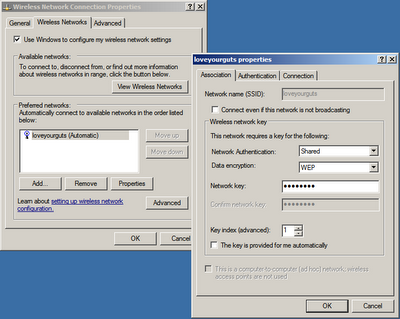
The solution that finally worked was to disable the LinkSys software managing the network card. Use Windows to manage the connection.

Right click on your network adapter and choose view available network connections. From that screen pick the manage preferred networks. You get the follow dialogs. Manually enter the SSID and other information like your wireless router has them. Bingo, my wireless machine connects automatically, every time.
Wednesday, July 09, 2008

Use your wings, try it again

It has been nearly 3 years since I wrote Use your wings. There is a new guy working here. We have been considering actually implementing unit tests, continuous integration. This kind of work requires front loading the process. He said something that caught my attention, "Pay the price to reduce the friction".

I have had reticence. I have been resisting this kind of change. I am nearing the end of a long project. I am not in the frame of mind to start this kind of investment in time and brain power.

In many ways for the last three years I have wondered and the power of using my wings. I have even these more effective processes a bit. Many times I have given up and walked home.

I still believe there is large improvements that can be made in my software development methodology. I commit to doing my best to suspend my disbelief. To incrementally start using units tests then continuous integration.